
After your Emby with Orbit service has been activated, follow these steps
Confirm Link
You will receive an email from Emby titled 'Confirm Emby Account Link'.
Open the email and click the 'I Confirm This Link' link.
Change Server
When you have access to more than one Emby server, a 'Change Server' option will appear in the drop-down menu when you click the person icon in the top right.
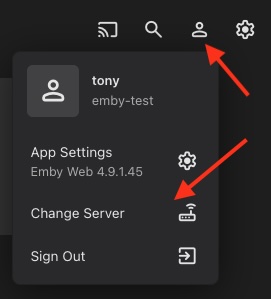
- Click Person Icon at top right of screen
- Select Change Server from drop-down list
A list of your servers is displayed
- Choose a server from the list
This needs to be done on EACH device
Emby Settings
App Settings like Home Screen, Playback and Subtitles are per server and will need to be adjusted to your preferences.
See Emby App Settings for guide.
Audio and Subtitle language are changed to English for you now when account is activated.