
Change / Reset Password
Your login is managed using the Emby Connect service.
-
Forgot your password: https://emby.media/community/index.php?/lostpassword/
-
Change email or password: See 'Changing your Emby Connect password' section at https://emby.media/support/articles/Emby-Connect.html
Whats the server address and port ?
You've skipped a step in the instructions... Signing in with Emby Connect takes care of this for you. See Emby Setup
Find/Show 'Recently Released Movies'
Sort order option
Click on the library (eg: Movies) and at the top of the page in the row of buttons click the one named 'Title' which is the sort order - change this to 'Release Date'
Home page section
Go to Settings (person icon in top right) -> App Settings -> Home Screen Change one of the sections to 'Recently Released Movies' Note that this is ordered by release date so a movie with a future release date will stay at the front of the list.
Change Server
Top right of screen: Person Icon -> 'Change Server'
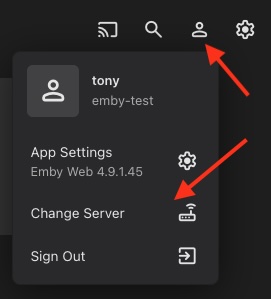
When you have access to more than one Emby server, a 'Change Server' option will appear in the drop-down menu when you click the person icon in the top right.
Need Help ?
Got a question thats not covered in the Wiki ? See Get Support to ask
Buffering or stuttering? See Buffering & Speed and Speed — what a speed test doesn't tell you